
The desktop app for dbt
The dbt workbench that never leaves your machine.
An interactive dependency graph, live run/build/test with streaming logs, an in-browser SQL editor, and full Git support — running against your dbt-core projects with no cloud account and no data leaving your laptop. With Pro, Wicky, an AI assistant that runs on your machine, answers questions about your models and your data.
Free and open-source core · Pro adds Wicky, a local AI assistant · macOS on Apple Silicon · Notarized by Apple
What's inside
Everything you'd script together, already wired up.
wickd replaces the loop of terminal, docs server, and a half-dozen browser tabs with one app that stays in sync with your project on disk.
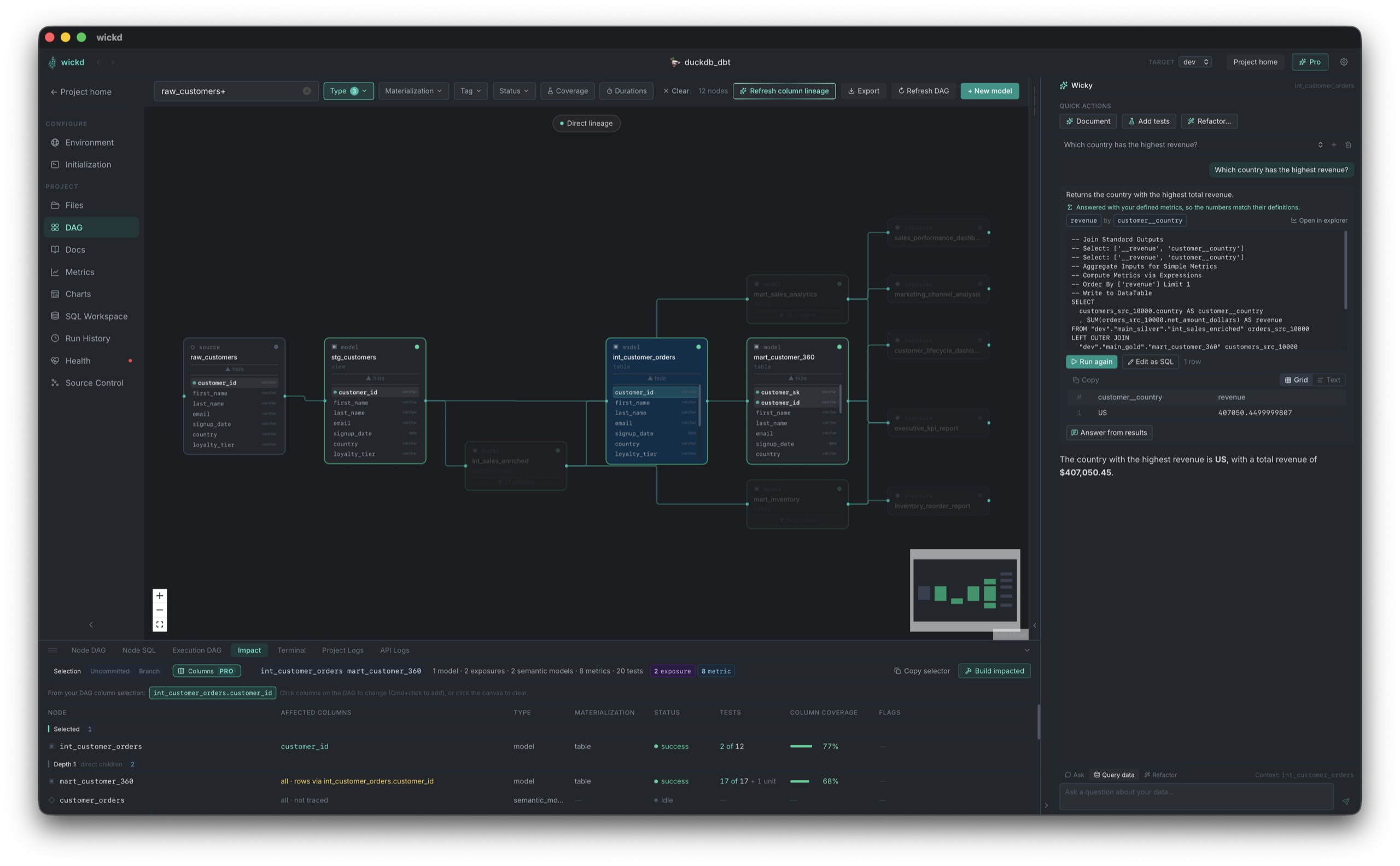
Interactive DAG
Dependency graph with live status badges, dbt selector syntax (+model, tag:x), and real-time updates while models run. Multi-select to run, build, or test a whole slice at once.
Run, build, test
Trigger any dbt command from the side panel with upstream/downstream/full selector support. Logs stream live — no separate terminal tab to babysit.
SQL Workspace
A standalone scratchpad with Monaco (the VS Code editor), a Compiled SQL tab, and a resizable results pane. Cmd+Enter runs, Cmd+S saves.
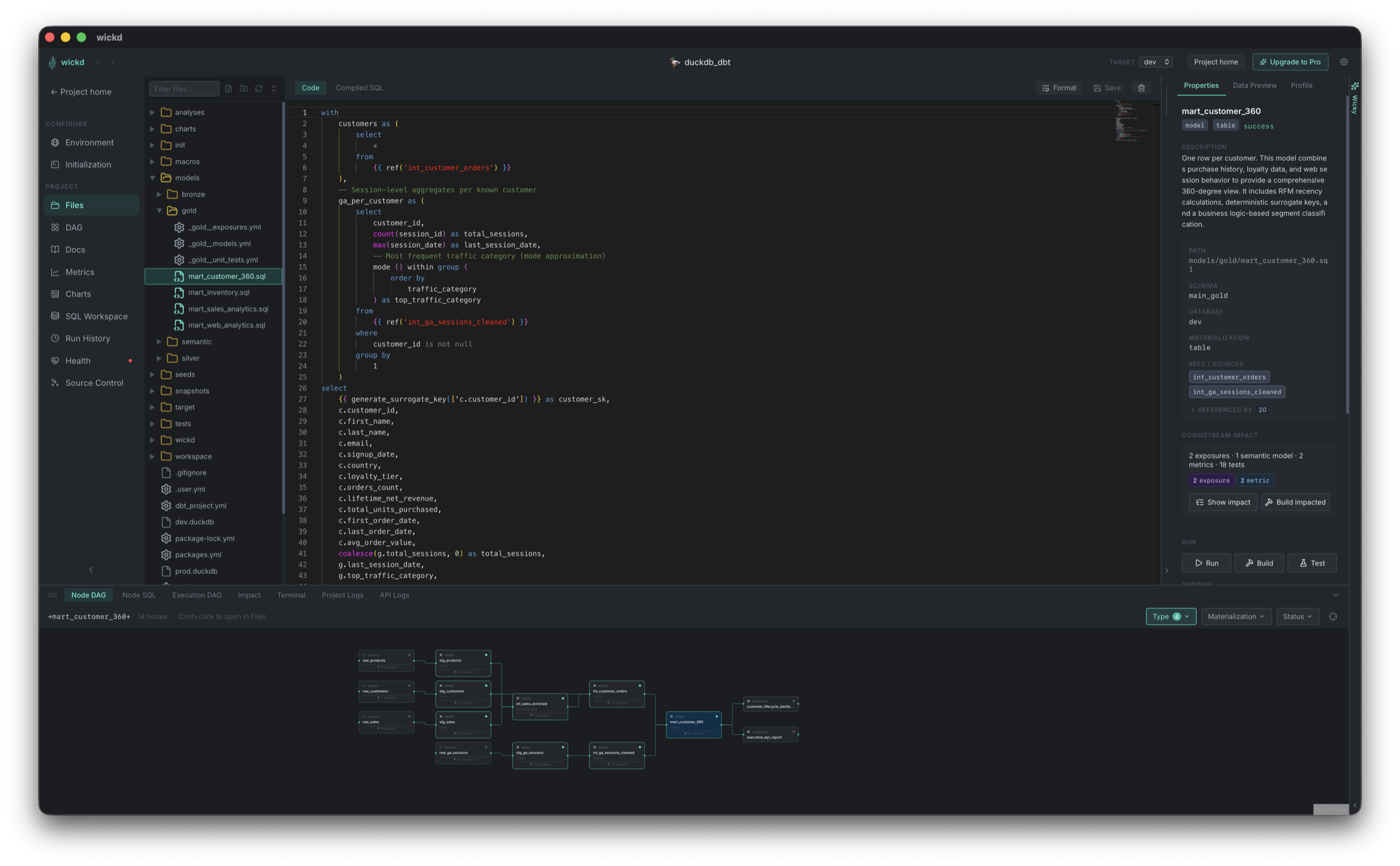
File explorer & editor
Browse your project tree and edit model SQL, YAML, and config in-browser, with ref/source autocomplete and cmd+click navigation. The tree works like VS Code’s: drag and drop (even from Finder), multi-select, cut/copy/paste, and inline rename.
Source control
A VSCode-style Git panel: stage, diff, commit, push/pull with live streaming output, branch switching, and commit history — without leaving the app.
Health & drift checks
One overview for your connection (dbt debug), schema drift between your warehouse and manifest.json, and source freshness — run them all in one click, see what's out of date, and fix drifted models in place.
Impact analysis
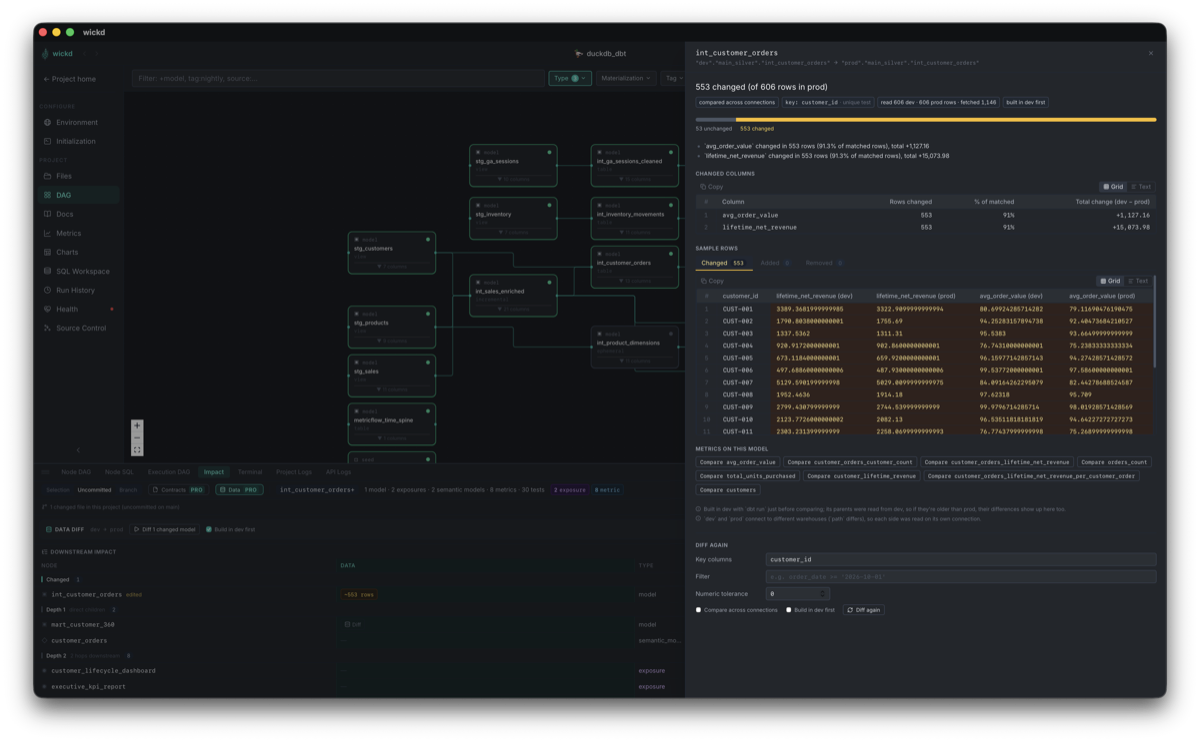
See everything downstream of a selection, your uncommitted changes, or your branch — with test counts and risk flags, and one click to build it all. Pro narrows it to the columns a change actually reaches, through filters and joins.
Wicky, the local AI assistant Pro
Ask about your models and your data, explain failing runs and tests, and generate docs and data tests you review before saving — on a model that runs on your machine. Meet Wicky →
Command palette
Hit ⌘K to jump to any page or model, or run any dbt command — with your recent commands a keystroke away.
DAG exports
Share the DAG exactly as you've filtered it — an interactive HTML page anyone can open offline and re-filter, with click-to-trace lineage, or a crisp SVG or PNG. The filters used are printed right on top.
wickd Pro · Meet Wicky
An AI assistant that knows your dbt project, and keeps it on your laptop.
Wicky lives in a panel beside every page. It sees the model you're looking at, its lineage, its columns and its last run. It runs on a model that downloads to your machine, so your SQL, your schema and your data never go to a cloud API. No API key, no per-token bill.
Ask about your project
"What feeds this model?" "Why is this incremental?" Wicky answers from your manifest, compiled SQL and lineage, not from guesses.
Ask about your data
Ask a question in plain English and Wicky writes the SQL. You see and edit the query, run it read-only against your warehouse, and get an answer from the actual results.
Explain a failure
When a model or its tests fail, one click sends Wicky the error, the SQL and a sample of the failing rows, and it tells you what went wrong and where to look.
Write your docs
Wicky drafts model and column descriptions from the SQL and the warehouse. You review the change as a diff and accept or reject each item before anything is saved.
Suggest data tests
Wicky samples the data and proposes generic tests like not_null, unique and accepted_values. Wicky checks every suggestion against the warehouse first, so the review shows which tests already pass.
Private by design
The bundled model runs on your Mac. Prefer your own? Point Wicky at any OpenAI-compatible endpoint, such as a local Ollama server.
Editing, not just browsing
Open a model, see everything about it.
The side panel surfaces dependencies, materialization, test coverage, and run controls without a page navigation — and the same Monaco editor VS Code uses is right there for edits.
Take a look around
Every page, right inside the app.
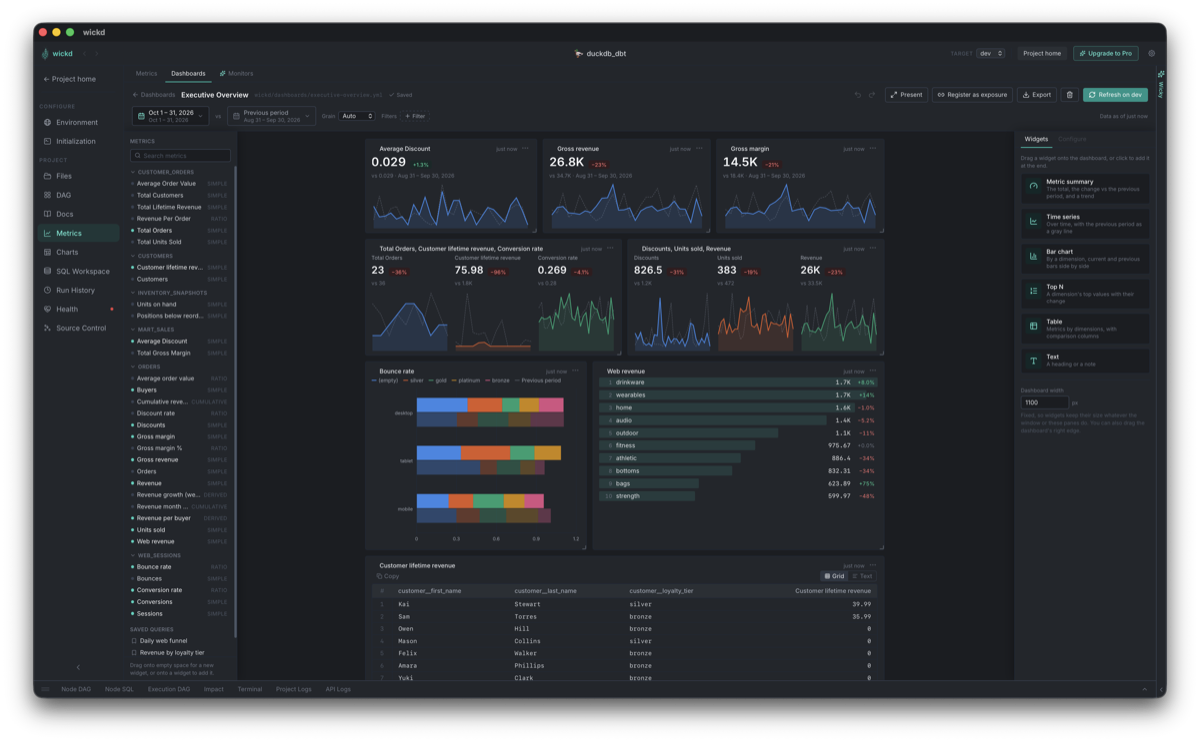
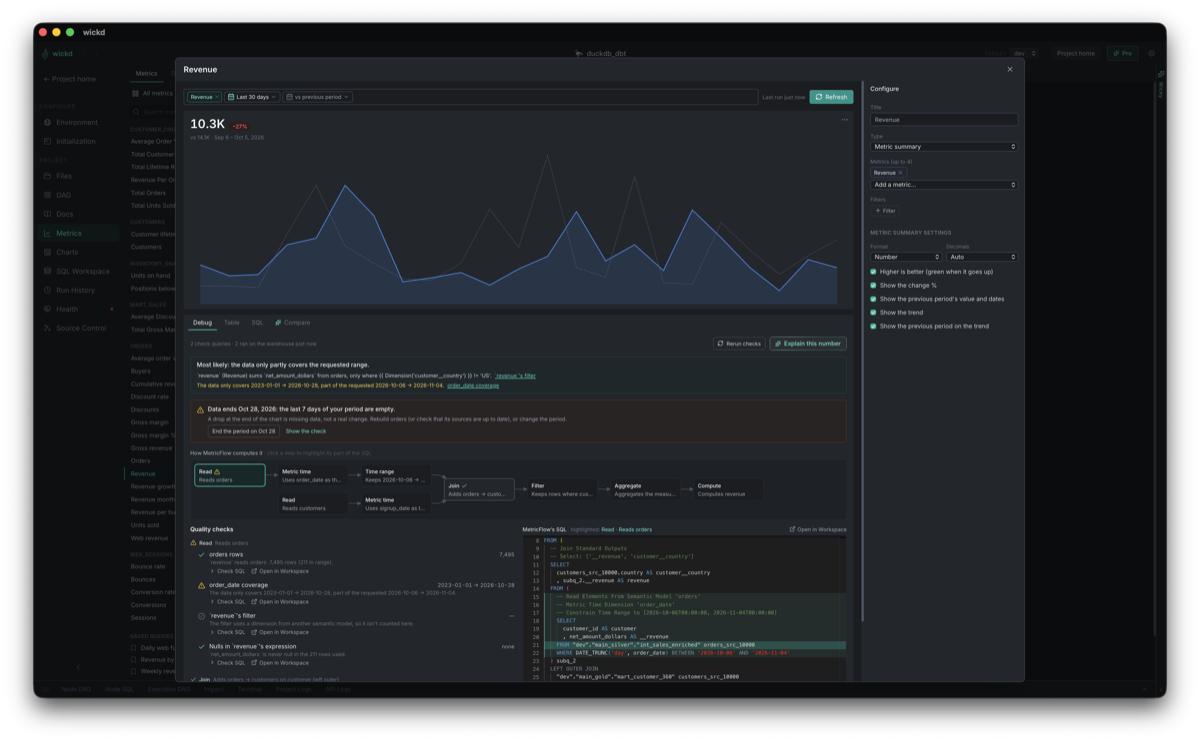
From metric dashboards to schema drift checks — a tour of what's actually in the window when you're using wickd.
Pricing
Free for the whole workflow. Pro adds Wicky.
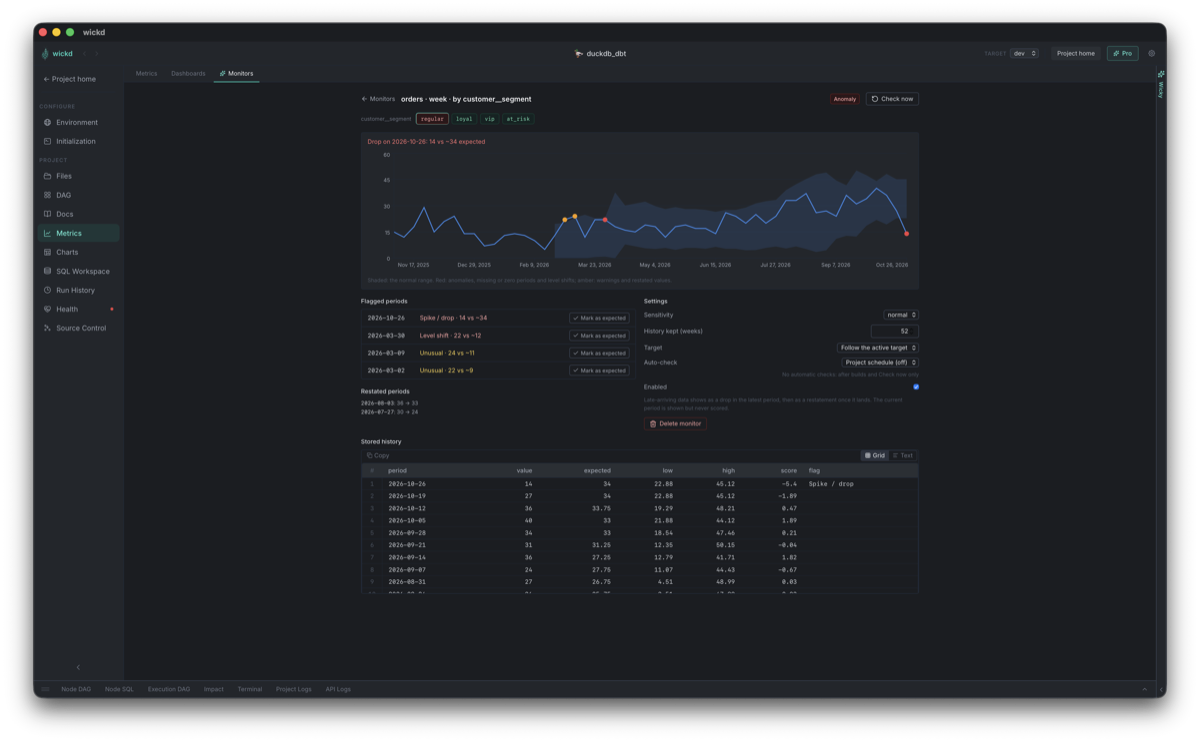
wickd's core is free and open-source, permanently. Pro is an optional subscription that adds Wicky, a local AI assistant, plus column-level lineage, column-level impact analysis, contract checks, data diff, lineage propagation, run performance insights, refactors, smarter test suggestions, semantic layer drafts, metric monitors, metric compare and metric explanations, with more on the way. It also helps fund continued development.
- Full interactive DAG & run/build/test
- File explorer, SQL editor, terminal
- Git source control
- Native docs browser
- Health check, schema drift & source freshness
- Documentation generator — add a model and its warehouse columns to schema YAML, reviewed as a diff before it's written
- Data preview — any model's output, plus the failing rows behind a failed test
- Column profiling & test coverage heatmap
- Model impact analysis — see what a selection, your uncommitted changes, or your branch affects downstream
- Semantic layer (MetricFlow) — metrics, semantic models & saved queries in the DAG, docs and impact analysis, with MetricFlow validations in Health
- Metric explorer — a page per metric (chart, definition, lineage, usage and health) and an index of every metric, plus queries by dimension, grain, filters and dates — typed in one line with autocomplete or clicked together — with MetricFlow's SQL live, charted and saved as dbt saved queries
- Metric dashboards — a drag-and-drop builder: drop metrics onto a canvas, pick widgets (summary, time series, bars, top N, table, text), compare the current period with the previous one and drill into any value; refresh in one warehouse run, export to HTML or PNG; saved as YAML in your project and registrable as dbt exposures
- dbt Charts boards — the dbt Charts boards in your project's
charts/folder, built as snapshots or opened live with working filters, with validation problems pointed at the line; metric dashboards export to a board - Metric debugging — when a number looks wrong, see MetricFlow's plan step by step and check it on your warehouse: rows in and in range, what the filter drops, nulls, join fan-out (double counting), unmatched rows and messy dimension values; reconcile it with a plain SQL query
- Run history — every invocation, with a timeline of what each dbt thread was doing and a DAG overlay of each model's median run time
- Live sync — dbt runs and git changes made outside the app show up without a reload
- Command palette (⌘K) — jump to any page or model, or run any dbt command
- Search across projects — find a model, source or column in any project and jump straight to it
- DAG exports — the DAG exactly as you've filtered it, as an interactive HTML page with the app's filters and model lineage tracing, or as SVG / PNG
- Everything in Base
- Wicky, the local AI assistant — ask questions about your models and your data, explain failing runs and tests, and generate docs and data tests you review before saving, on a model that runs on your machine. No API key, nothing sent to the cloud. More about Wicky
- Column-level lineage tracing across the DAG, derived from compiled SQL — no yml docs required, and included in interactive DAG exports
- Column-level impact analysis — only the columns, models & tests a change reaches, including through filters and joins
- Contract checks — before you merge, the columns your changes remove, rename or retype and everything that still uses them (models, tests, exposures, semantic models, metrics, dashboards and monitors), plus models that no longer match their enforced contract
- Data diff — build your changed models in dev and compare them with prod row by row: rows added, removed and changed, which columns changed and by how much, schema differences and sample rows, in-warehouse or across separate connections
- Lineage propagation — fill empty column descriptions from the upstream columns they pass through, and trace tagged columns like
piito every model, column and exposure they reach - Run performance insights — each run's critical path, models that got slower than usual, and recommendations like making a model incremental or raising threads
- Refactors — rename a model or a column everywhere it's used, or extract a CTE into its own model, reviewed as one diff before anything is written, with
dbt parseafterwards and one-click undo - Smarter test suggestions —
relationshipsandnot_nullon the columns other models join on,uniqueon each model's grain, ranked by how much depends on them with the evidence for each; Health → Test Gaps adds them across many models at once, no AI model needed - Semantic layer drafts — “Add to semantic layer” on any model: Wicky drafts the semantic model and starting metrics, checks them with MetricFlow and runs each one before you review the YAML; Query data answers with your defined metrics when they cover the question, and the metric explorer's query line takes a question in words and fills itself in
- Metric monitors — watch metrics for spikes, drops, level shifts, missing periods and restated history against a seasonal baseline; checked after builds that touch them, with status on the Health page, DAG, Impact and dashboard tiles
- Metric compare — see what your changes do to a metric's numbers before you merge: uncommitted changes vs HEAD, your branch vs its base, dev vs prod or two metrics, with the rows that moved and the SQL diff
- Metric explanations — “Explain this number” writes up what the debug checks and the definition say about a metric's value, most likely cause first
- New Pro features as they ship
- Priority support
You'll get a license key by email — paste it into Settings → Subscription in the app. How it works
Get started
Three steps to your first DAG.
dbt_project.yml files and lists everything it finds.